



Xbox PC App Adds Steam, Epic Store, and More Storefront Games to Library - News
by William D'Angelo , posted on 16 September 2025 / 8,165 Views
Microsoft has released a new update for the Xbox PC app that adds a new aggregated gaming library that shows installed games from multiple PC storefront, including Steam, Epic Games Store, Xbox library, Xbox Game Pass, Battle.net, and more storefronts.
The change is primarily designed for the new fullscreen Xbox experience that will be available on the ROG Xbox Ally devices when they launch on October 16.
Games installed from a supported PC storefront will automatically appear in "My Library" and "Most Recent" in the Xbox PC app.
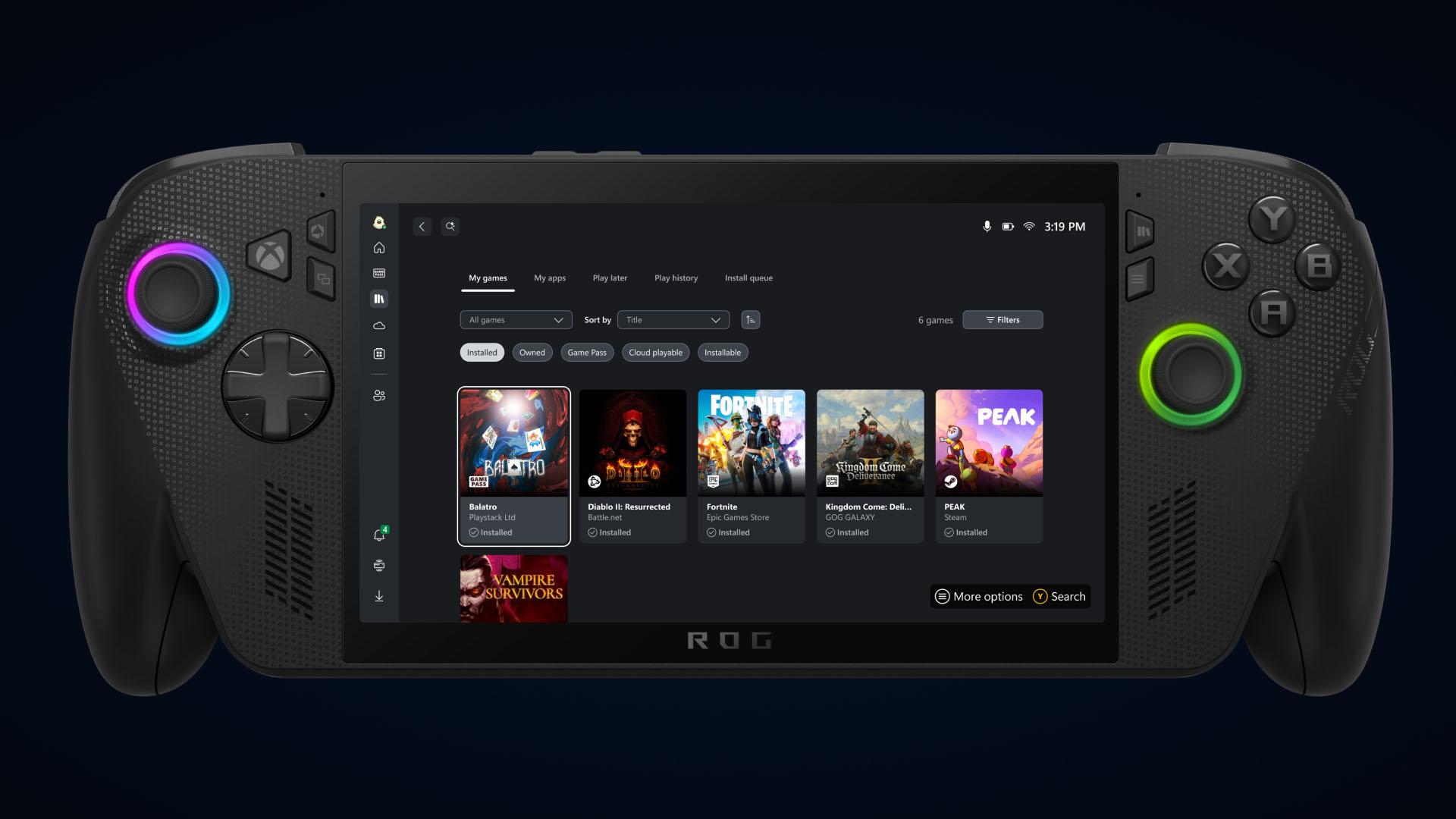
Read details on the update below:
Aggregated Gaming Library to Launch Your Games
Bring your game collection together with the new aggregated gaming library that shows your installed games from multiple PC storefronts, including your Xbox library, Xbox Game Pass, Battle.net and other leading PC storefronts, making it easier than ever to access your games in one place, whether you’re on a Windows PC or handheld device.
When you install a game from a supported PC storefront, it automatically appears in “My Library” within the Xbox PC app, as well as the “Most Recent” list of titles in the sidebar, so you can jump back into your favorite games with just a click.
Control What You See in Your Library
Games installed from supported PC storefronts will automatically appear in My Library and in the Most Recent section of the Xbox PC app.
Prefer a more simplified view?
- Select your profile picture
- Head to Settings
- Go to Library & Extensions
- Find the storefronts listed
- Toggle any listings you’d prefer not to see
Once disabled, those titles will no longer appear in your library, giving you full control over how your library looks and feels.
Get to other PC Storefronts Faster with My Apps
This new tab in my library brings third-party apps and storefronts together in one convenient place, supporting the aggregated gaming library so you can find, download, and launch games from multiple locations, without switching between apps or your desktop.
Just Pick Up and Play
Coming later in September your cloud-playable games and game play history will follow you across all your devices.
To find out which games are cloud playable, select the “cloud playable” filter in “My games” to view your catalog of supported titles.
Once this feature is released, look for the “Jump back in” list on the Home screen of your console, PC, or handheld to find your recent play history and pick up where you left off.
A life-long and avid gamer, William D'Angelo was first introduced to VGChartz in 2007. After years of supporting the site, he was brought on in 2010 as a junior analyst, working his way up to lead analyst in 2012 and taking over the hardware estimates in 2017. He has expanded his involvement in the gaming community by producing content on his own YouTube channel and Twitch channel. You can follow the author on Bluesky.