


Xbox February Update Adds Touch Controls in Xbox Remote Play, Improved Sorting, and More - News
by William D'Angelo , posted on 14 February 2024 / 2,816 Views
Microsoft and Xbox have announced the February update for Xbox has begun rolling out.
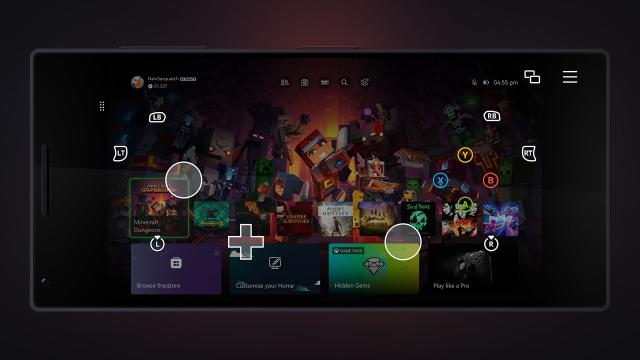
The update adds touch controls enabled in Xbox remote play, new thumbstick calibration tool for Xbox Wireless Controllers, improved filtering and sorting – My games & apps, and more.
Read the Xbox Wire post on the update below:
Touch controls enabled in Xbox remote play
Want to play games when away from your console, but don’t have your Xbox Wireless Controller handy? No problem! Xbox remote play now supports custom touch control layouts on more than a hundred games when using the Xbox app on iOS, Android, and Windows devices. The same custom touch layouts available through Xbox Cloud Gaming (Beta) will now be available when remotely playing games from your personal console. This includes games like Minecraft Dungeons, Psychonauts 2, Sea of Thieves, and many more. Additionally, a basic touch control layout can now be used for most other games.
New thumbstick recalibration tool for Xbox Wireless Controllers
We’re excited to release a user-guided, self-calibration tool on the Xbox Accessories app that helps you to recalibrate thumbsticks for Xbox Wireless Controllers. This is part of Xbox’s continued investment in improving the repairability experience of controllers. To address minor thumbstick issues such as inconsistent responses, use the self-calibration tool in the Xbox Accessories app on console or PC to resolve issues without the need for support calls, controller repairs, or returns.
Xbox enables owners of Xbox Wireless Controllers to self-repair their devices by selling official replacement parts in the Microsoft Store. If you’re self-repairing your controller, the thumbstick recalibration tool should be used after you have replaced the controller’s base and circuit board, as that will likely disrupt thumbstick calibration values. Not all thumbstick issues can be resolved with this recalibration tool, including drift due to normal wear and tear.
Improved filtering and sorting – My games & apps
We’ve added new filters and sorts to My games & apps to help you find exactly what you’re looking for on your Xbox. You can now filter games by accessibility, supported languages, and technical features. For example, if you want to see which games are touch-enabled for remote play, you can filter by Technical features > Touch enabled and find your next game to play.
Additionally, subscription tabs in your full library have been updated to sort by Recently added, making it easier to see what’s new in subscriptions like Xbox Game Pass and EA Play. You can always adjust the sorting to find games to play in your library. Just head to My games & apps > Full library, and you’ll find all the new filtering and sorting options.
Automatic profile sign-out
A new access restriction option has been created to make it easier to play on shared consoles in places like hospitals. Some children’s hospitals have programs to provide consoles that can be wheeled into a patient’s room and give them time to play and connect with friends. The new option makes it easier for player’s profiles to be deleted when they sign out, and it removes the need to check if patients have signed out of the consoles when the gaming cart gets moved between patients.
To view and adjust the new options, navigate to Settings > System > Access restrictions to allow use of the Edge web browser, set a Home console, and to delete profiles on sign-out.
A life-long and avid gamer, William D'Angelo was first introduced to VGChartz in 2007. After years of supporting the site, he was brought on in 2010 as a junior analyst, working his way up to lead analyst in 2012 and taking over the hardware estimates in 2017. He has expanded his involvement in the gaming community by producing content on his own YouTube channel and Twitch channel. You can contact the author on Twitter @TrunksWD.