



Dragon Quest Builders 2 Info Details Photo Mode - News
by William D'Angelo , posted on 19 November 2018 / 2,482 Views
Square Enix has released new information for Dragon Quest Builders 2 that details Photo Mode.
Read the information below:
Take Pictures of Your Prided Work in Photo Mode
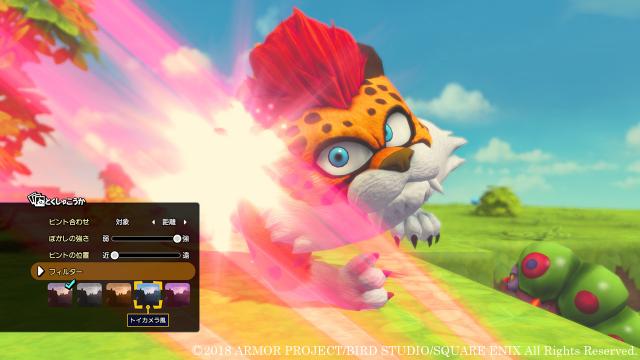
Dragon Quest Builders 2 includes a Photo Mode, through which you can take pictures of your prided works and beautiful landscapes. In this mode, you can change the point of view, zoom in and out, remove the protagonist from view, and freely take photos. Additionally, you can apply blurring and filters such as monochrome and sepia.
—Zoom in, rotate, and change the perspectives of photos as you please.
—You can even remove the protagonist from view.
—Blur the background and filter your photos.
Post Your Photos on the Bulletin Board and Get Lots of Likes!
If you take a nice photograph, you can post it on the Bulletin Board. On the Bulletin Board, you can see other players’ photographs by connecting online. Works that are popular among other players, such as those that receive a lot of Likes!, will take up the most space and attract everyone’s attention. Additionally, by publishing a photo in a terrain set, other players will be able to visit the world of your photo. Photo contests that utilize the Bulletin Board are also planned to be held.
—If you take a nice photo, you can share it through the Bulletin Board.
—Works that receive a lot of Likes! will attract everyone’s attention.
—You can save the photos you like to your album.
—You can even visit the Vacant Islands of photos to see their beautiful scenery before your own eyes.
Recreate Buildings and Objects by Friends with the “Builder Pencil” Builder Tool
In situations where you want to recreate buildings objects created by friends, you can use the Builder Pencil. This builder tool records blueprints of buildings and objects within the area enclosed by the pencil. By referring to said blueprints, you can make the building or object yourself.
—This is the Builder Pencil.
—By scanning the area enclosed by the pencil, you can record it as a blueprint.
—Refer to the blueprint to make it yourself.
Dragon Quest Builders 2 will launch for the Nintendo Switch and the PlayStation 4 on December 20 in Japan, and in North America and Europe in 2019.
A life-long and avid gamer, William D'Angelo was first introduced to VGChartz in 2007. After years of supporting the site, he was brought on in 2010 as a junior analyst, working his way up to lead analyst in 2012. He has expanded his involvement in the gaming community by producing content on his own YouTube channel and Twitch channel dedicated to gaming Let's Plays and tutorials. You can contact the author at wdangelo@vgchartz.com or on Twitter @TrunksWD.