


Xbox November Update Adds Compact Mode, Japanese Language Support for Keyboards, and More - News
by William D'Angelo , posted on 01 December 2023 / 2,810 Views
Microsoft and Xbox have announced the November update for Xbox has begun rolling out.
The update adds a Compact mode for the Xbox app on PC, Japanese language support for keyboards, and more.
Read the Xbox Wire post on the update below:
PC Gaming | Xbox app on PC experience updates
Introducing Compact mode
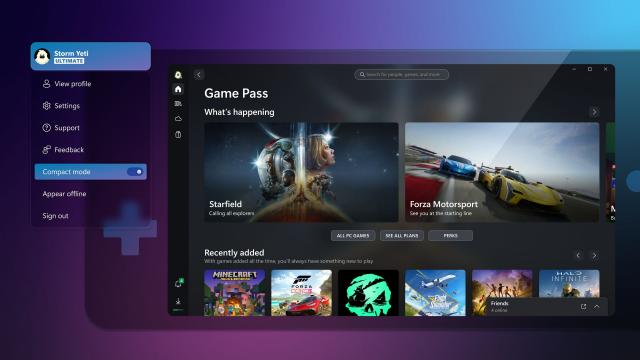
We’re excited to announce that Compact mode is now available as part of the latest update on all Windows devices, including handhelds like the Asus ROG Ally and Lenovo Legion Go! Compact mode is a new feature that enhances your gaming experience by providing a more intuitive user interface on smaller screens. With Compact mode, the side bar collapses into icons, providing you with more space to browse content. To use this feature, click on your profile in the top-left corner of the app and turn the toggle for “Compact mode” on.
We’re also partnering with Asus and other manufacturers to ensure that Compact mode is enabled by default on your handheld devices. We’ll continue to focus on updates to deliver a great Xbox app experience for Windows handheld screens.
Notifications and banners
With new games and benefits coming to Game Pass all the time, we’re making it easier to keep up with what’s new by giving you the option to show only unread notifications in the notification dropdown on the Xbox app on PC.
Additional improvements
We’ve heard that you want a more streamlined experience when diagnosing and troubleshooting, so we’ve added the new Gaming Services Repair Tool, a dedicated tool to fix any issues with Gaming Services or missing content when launching the Xbox app on PC. To use this feature, click on your profile in the top-left corner of the app and select “Support.”
Xbox console updates
Japanese language support for physical and virtual keyboards
You can now select specific keyboard layouts for Japanese keyboards for your console. For example, you can choose between the 106/109 keyboard layout for Japanese or the 101/102 English keyboard layout.
To update your keyboard settings, press the Xbox button on your Wireless Controller to open the guide, and then go to Settings > System > Language & location. You’ll be able to select the Japanese keyboard layout if the Keyboard & dictation setting is set to Japanese.
A life-long and avid gamer, William D'Angelo was first introduced to VGChartz in 2007. After years of supporting the site, he was brought on in 2010 as a junior analyst, working his way up to lead analyst in 2012 and taking over the hardware estimates in 2017. He has expanded his involvement in the gaming community by producing content on his own YouTube channel and Twitch channel. You can contact the author on Twitter @TrunksWD.
More Articles

There is some pretty important news about microsoft and xbox today.

You mean the news about Xbox wanting to expand to other platforms? This has been known for years now.

Lol yup, someone's late to the party. If that's what he's referring to
We all be a big family soon.
We already should be since we're all gamers aren't we? :)
"It's a bit of a change of strategy. Not announcing anything broadly here, but our mission is to bring our first-party experiences [and] our subscription services to every screen that can play games," Stuart said (via GameSpot).
Its not just gamepass ;P brother gamer
Is that a bad thing? More people get to play the better. If that's their plan, I could see MS going third party eventually as that plan would diminish Xbox's value as a console.

Wishful thinking.